
Rinari docsWorking with Rinari
Notes with suggested tasks
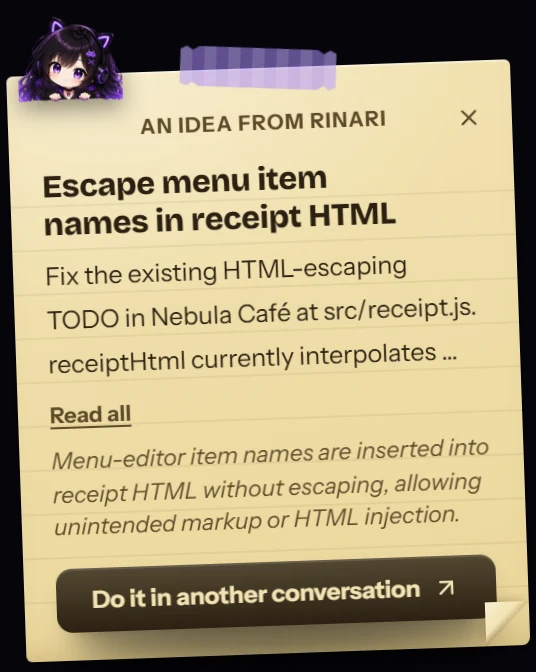
When Rinari spots something worth doing outside what you asked, she leaves a note. Seeing it starts nothing; accepting it opens a new conversation with the task.
You are here
While she works, Rinari sometimes notices something worth doing that isn’t part of what you asked: a bug next to the one she’s fixing, a missing check, a TODO that matters. Instead of doing it on her own or burying it in the final report, she leaves you a note.
What a note does
Nothing, until you say so. A note is a suggestion: seeing it starts no work and changes nothing in your project.
- Do it in another conversation opens a new conversation — in the same project and profile — that starts the task. The conversation you were in keeps going on its own.
- Dismiss the note peels it away.
- Read all expands a long note.
One note shows at a time; if there are more, they wait behind it. Notes sit in the margin beside the conversation. When the window is too narrow for that, a note waits as a small Note from Rinari chip and opens when you click it, so it never covers the conversation or the composer.
Notes after reading the web
If a note came up after Rinari read content from the internet, it says so: Came up after reading internet content: review it first. Web pages are material to inspect, never instructions, so read the suggestion before accepting it. See Approvals and permissions.