
Rinari docsGet started
Connect a provider
Add a model provider, test the connection, discover models and give them an alias you can pick in the composer.
You are here
Rinari needs a model provider to work. You bring the connection — a cloud API, a subscription or a model running on your own machine — and the engine keeps it, so the desktop app and the CLI share the same providers and credentials.
First launch
On first launch the app opens Set up your provider, which walks through five steps:
- Pick a preset — the kind of provider.
- Connection — endpoint and authentication.
- Test & discover — checks the connection and reads the model catalog.
- Pick your models — choose the models you want to use.
- Done — start chatting.
Set up later skips the wizard. You can add providers at any time from Settings → Providers.
Add a provider
In Settings → Providers, choose Add provider and pick a preset. The list comes from the engine, and includes:
- OpenAI and Anthropic;
- OpenRouter, Google Gemini, DeepSeek, Mistral, xAI (Grok), Groq, Together AI, DeepInfra, Fireworks, OpenCode Zen and OpenCode Go, Z.ai, Moonshot / Kimi and MiniMax;
- Ollama and LM Studio, for local models;
- Custom endpoint, for any other OpenAI-compatible API.
ChatGPT (subscription, Codex access) and GitHub Copilot sign in through your browser instead of an API key. Both are marked experimental.
Claude Subscription (experimental)
Claude Subscription uses your Claude plan through the official Claude Code CLI, which has to be installed on your computer. It’s off by default: turn it on with the Claude Subscription (experimental) switch in Settings → Providers, and it appears among the providers you can add. If Claude Code isn’t installed yet, the provider guides you through installing it. Turning it off stops the saved ones.
Rinari’s tools — files, terminal and the rest — work with it, and they always go through Rinari, with its permissions, approvals and activity. Claude Code doesn’t run anything on its own. From a terminal: rinari providers add --claude-subscription.
A preset fills in the endpoint for you. For a custom endpoint, enter its base URL.
Authentication
Choose how the engine gets the credential:
| Option | How it works |
|---|---|
| API key | The key is stored in the engine’s secret store and never persists in the browser. |
| Environment variable | Enter the variable’s name (for example OPENAI_API_KEY), not its value. The engine resolves it in its own process. |
| No auth (local) | For local servers such as Ollama or LM Studio. |
Credentials belong to the engine, not to the app’s interface, and they are never written to the frontend’s browser storage.
Test and discover models
Test checks the connection and reports how many models it found. Discover models reads the provider’s catalog.
Discovering models proves that the catalog is reachable. Generation, tool calling and vision need their own checks, so a model that appears in the list can still fail on a real turn — for example, if it doesn’t support tools.
Save models with an alias
Save the models you want with an alias — the display name you’ll see in the composer. Pick the model for a conversation from the composer, along with its reasoning effort when the model supports it.
Reasoning effort
The reasoning chip next to the model opens a slider from Faster to Smarter: Default, then levels up to Extra high, Maximum and Ultra on compatible models.
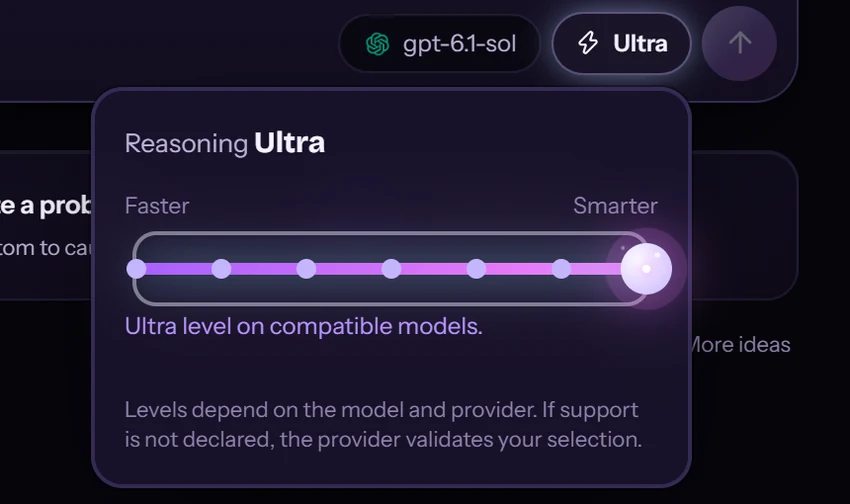
Levels depend on the model and the provider. If a model doesn’t declare which ones it supports, the provider validates your selection.
Changing the active provider or model never deletes the configuration of the others; each provider remembers its last model.
Local models
Local presets point to the default address of each server:
| Server | Default endpoint |
|---|---|
| Ollama | http://localhost:11434/v1 |
| LM Studio | http://localhost:1234/v1 |
The server has to be running before you test the connection, and the model has to be loaded or available to it. Local models need suitable hardware, and many small models don’t support tool calling well.
From the terminal
The CLI uses the same engine configuration. To set up a provider from a terminal:
rinari setup
rinari providers list
rinari providers test <alias>
rinari doctor inspects your installation without changing credentials or state.
Costs and data
Remote providers may charge for usage. A local desktop app doesn’t make every task offline: cloud models and external tools send data to the services you configure.
Next: open your first project. To give Rinari’s built-in agents their own models, see Subagents.