
Rinari docsWorkspace
Profiles
Each Rinari profile is a workspace with its own projects and conversations, and a way of working — personality, mode and models per agent.
You are here
A profile keeps a separate workspace: its own projects and conversations, so work for one client, a side project or a study session doesn’t mix with the rest. Everything you had before 0.3 lives in the Default profile.
A profile also saves a way of working: the personality (Soul), the mode and the models for each agent.
Switch profile
The sidebar header shows Rinari and the active profile. Open it to see every profile with how many projects and conversations it holds, and pick one to switch. The sidebar then shows only that profile’s projects and conversations.
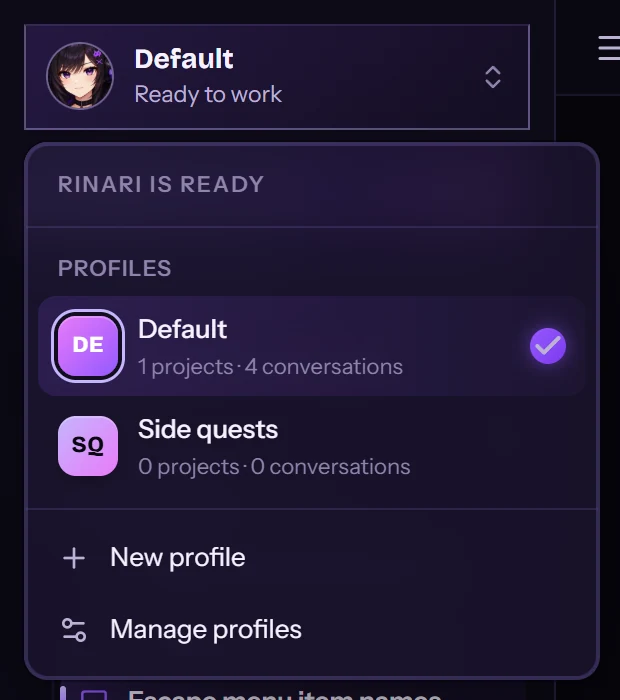
The same menu has New profile and Manage profiles. A new profile starts empty: start a conversation or open a project and it stays in that profile.
Move work between profiles
Projects and conversations have Move to profile in their menus.
- A project moves with all its conversations.
- A conversation without a project moves on its own.
- A conversation that belongs to a project asks first, because a project lives in one profile: Take it out of the project (it moves alone and stops being part of the project) or Move the whole project.
Manage profiles
Settings → Profiles lists your profiles. Create profile asks for an ID (lowercase letters, digits and dashes), a Name, and optionally a Soul and a Mode for its conversations.
Apply changes the open conversation to that profile’s way of working: its personality, its mode and its models per agent. The models per agent follow the profile of each conversation, so two conversations in different profiles can use different models for the same agent.
In the terminal
Profiles are shared with the CLI as rinari bundles:
rinari bundles list
rinari bundles activate <profile-id>
rinari bundles create <profile-id> --name "Side quests" --mode plan
rinari bundles move-project <project> <profile-id>
rinari bundles move-session <session-id> <profile-id>
create also takes --soul, --description, --agent NAME=MODEL[,FALLBACK] (repeatable) and --activate. move-session takes --with-project to move a project conversation together with its whole project.
The active profile is shared with the desktop app: what activate changes in the terminal, the app picks up when its window gets focus again.
Don’t confuse it with
rinari profiles, which manages capability and configuration profiles, not workspaces.